Canon imageCLASS MF4370DN Laser All-in-One Printer Review
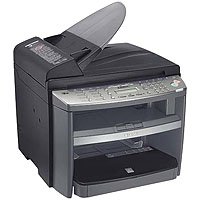
Since returning to school, I've spent more than twice the price of this printer on ink cartridges for my little HP printer. When I finally found my brain and decided to invest in a laser, the name Canon was what drew me to this particular printer, and the price was what made me buy it.
It ceased functioning via network shortly after I hooked it up, and I've seen other complaints about the same. HOWEVER, connecting via USB works just fine, at least with Windows XP. I have yet to try it out on my new computer with Windows 7. It took less than 5 minutes to set up, and it prints quickly and quietly. Physical assembly was a piece of cake, and the step-by-step set-up guide for installation is easy to understand and follow.
While trying to troubleshoot the networking issue has been problematic, I haven't come to the conclusion that the printer is the source of the problem. I live in a building with decades-old wiring, and I had problems with networking before I ever bought this printer. Replacing the router has not fixed the issue, and I'm leaning toward placing the blame on a weak incoming signal...something to keep in mind if you're living in a multiple unit building and/or trying to share a network.
I like the menu features, though there are more little bells and whistles than I personally need. I just need it to print quickly, I want it to print quietly, and I want volume. I get all of those. Though the copy function is much louder than the print function, it seems to copy just as well as any of the commercial black and white lasers I've encountered, and I haven't as of yet had problems with paper jams. I haven't used the fax function or the scanner at the time of this review, but so far I'm happy with the machine, in spite of the networking issues.
It is big and bulky and heavy? Yes, but it takes up no more surface area than my inkjet, and having an auto document feeder and discrete trays more than make up for the additional height and weight. Another great bonus as far as I'm concerned is the fact that - unlike my HP inkjet - it doesn't shoot my pages across the room when it finishes printing. It boots up almost immediately, goes into powersave mode after only a minute or so of idling, and wakes up within a second or two of me initiating a print command from my computer.
The dust cover for the paper tray feels a little chintzy, but I can live with that, because this printer will have paid for itself long before I graduate. Though it would be a bit more convenient to have it on a network, I don't NEED it to be, and - after price checking - if I could do it all over again, I'd probably buy the same printer. It's a reputable brand, comes at an excellent price for its capabilities, and it appears at the time of this review to be cheaper than many of its non-networking peers with lower ratings.
To summarize, for Windows XP users who want a no-frills black and white multi-function laser document printer that's easy to set up, and don't care about networking, I'd suggest this one. Would I be happier if I could have it on a network? Absolutely, and I'll address it as I have time to schedule a visit by a cable tech. If I find that the Canon ImageClass mf4379db is the source of the problem, I'll amend this review. In the meantime, it does everything I need it to, and I still consider it a good value. Thanks for reading.
Canon imageCLASS MF4370DN Laser All-in-One Printer Feature
- 1 to 2 sided printing,copying, and faxing
- Print and Copy up to 23 ppm
- Quick First Print provides first copy in approximately 9 seconds
- Built-in Networking and Energy effcient with only 3W of energy used
- 35 sheet ADF and 250 sheet Paper Cassette tray
Canon imageCLASS MF4370DN Laser All-in-One Printer Overview
Desktop Functionality in an Affordable Network-Ready Device Print, Copy, Fax, Scan and Network using the imageCLASS® MF4370dn Networkable: The imageCLASS MF4370dn delivers large-office network capabilities in an affordable compact package. It can be connected over an Ethernet, so everyone can easily share printing, PC faxing and scanning directly from their PC. Smart Paper Handling: The MF4370dn boasts print and copy speeds of up to 23 pages-per-minute (ppm) for letter-sized output, and delivers Quick First Prints or copy pages in approximately nine seconds. It has the versatility to duplex print directly from a PC as well as duplex print incoming faxes and copy letter-sized documents, helping reduce paper consumption in the home or office. Through the device's 35-sheet automatic document feeder (ADF), the unit will also copy single-sided documents and output double-sided pages for quick and efficient workflows. Multifunctional: The imageCLASS MF4370dn capture scans in a 24-bit color at an interpolated resolution of up to 9600 dots-per-inch (dpi) through its ADF or platen glass. The new device transmits documents seamlessly and quickly with Super G3 Fax, reaching speeds of approximately 33.6 Kbps. Single Cartridge System: The MF4370dn also incorporates the Canon Single Cartridge System, which combines the toner and drum in one easy-to-replace unit, resulting in excellent image quality retention and eliminating the complication and warehousing of separate toner and drum consumables.
Available at Amazon Check Price Now!
*** Product Information and Prices Stored: Oct 03, 2010 10:33:04

No comments:
Post a Comment